|
All
C-Organizer entries supports attachments. You can attach any files
to the entry.
Note: all files will be stored directly in the database
and will be accessible even if you delete them from your
computer.
To
work with the attached files, go to the "Attachments" tab in the "Add/Edit entry" window:
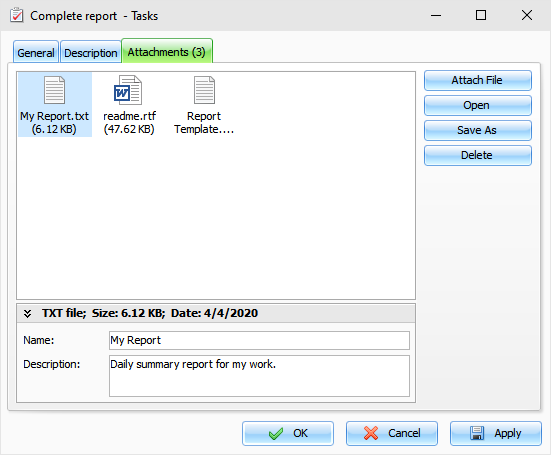
At
the bottom of this window you can see a summary information about
attached file, can change file name
and add file
description, if
necessary.
To
attach a file click the "Attach File" button and select a file to attach. As
alternate way you can drag any file to "Attachments"
area.
Note:
all files will be stored directly in
the database and will be accessible even if you delete them from
your computer.
When
entry contains any attachments, you will see the attachments count
in the tab caption.
Click
the "Open" button to open attached file.
To
save attached file to your disk click the "Save As" button.
To
delete selected attachment, click the "Delete" button.
You
can view attached files directly in the main window. Just click an
attachment picture near the entry title:

Just
click a file name and this file will be opened.
Also
you can find all your attachments in the Attachments
manager window.
|