|
The
Export function allows converting C-Organizer database information
into other formats and sharing this information with other
programs.
To
use this function, choose the "File -
Export" program's main menu
item.
The
export dialog box will appear:
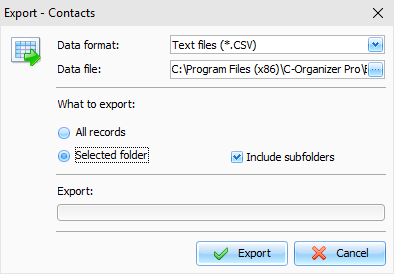
Set
the format you would like to convert the information to.
The
following formats are supported:
Text files (*.CSV)
XML files (*.XML)
C-Organizer databases
(*.CNDB)
Specify the file you want to export the
information to.
Choose the information you would like to export,
using What
to export options.
Then
click the "Export" button.
You
will see the Export progress indicator in the lower part of the
dialog box. A notification message will appear when the export
process is complete.
Note: C-Organizer offers to export entries from the
current selected section. So if you have opened Contacts section in
the main window and opened Export, the entries from the Contacts
section will be exported.
|