|
This
mode combines all your appointments, tasks, birthdays and events information, displaying it in one place. We
introduced the Today feature to simplify your time planning process
and to speed up the access to information needed.
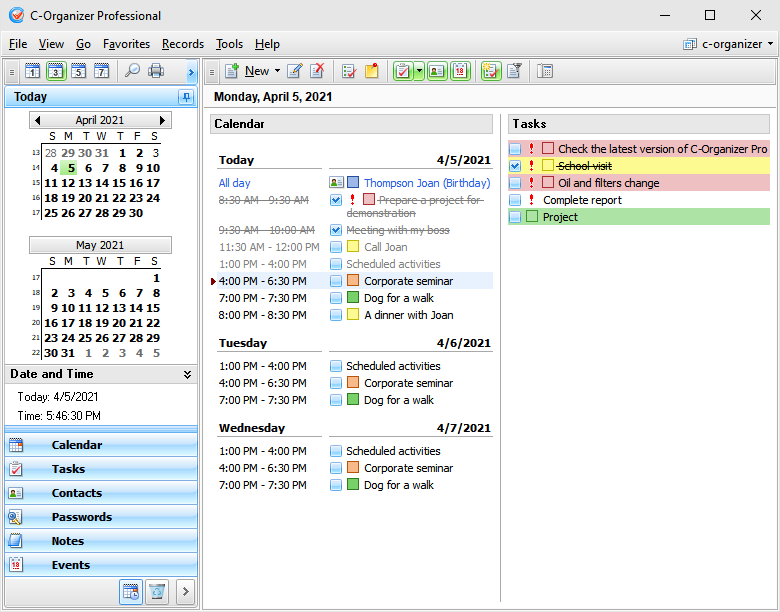
You
can set up different time periods to display your
information: 1, 3, 5 or 7 Days. Moreover, unlike most competitors, C-Organizer
allows to select not only period. You can select any date on the
program's calendar and C-Organizer will show a summary information for
selected date!
To
edit any entry you can simple double click it and it will be opened
for editing. Moreover you can edit your appointments and tasks
directly in Today mode or by clicking an appropriate button on the
program's toolbar.
C-Organizer allows to show and hide birthdays,
tasks and events. Just click an appropriate buttons:
"Show
Contacts",
"Show
Events" or
"Show
Tasks".
Moreover, the "Show Tasks" command has several additional options:
Show Tasks for selected
period - when this option is
on, C-Organizer will show tasks, which match to selected period on
the program's calendar.
Show Tasks without date
- if this option is selected,
C-Organizer will include tasks without date into the Today's
report.
Show all Tasks
- when this option is on, C-Organizer
won't filter tasks by period and will show all tasks
entries.
Please note, that you can show or hide completed
tasks and appointments by clicking the "Show
Completed" button.
Also
all entries can be filtered by category. See the Working with
Categories help topic.
To print the Today report, please click the
"Print" button. "Today" window will be printed "As Is".
If necessary, you can edit this report in the "Print Preview"
window.
|