|
To
print appointments, click the "Print" button or use the Ctrl + P shortcut.
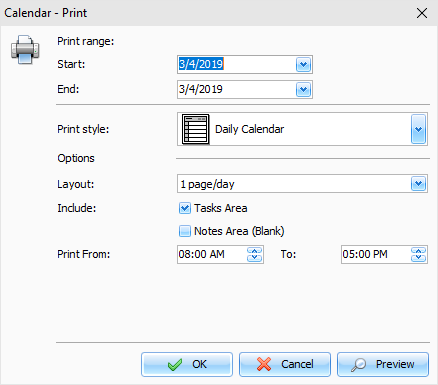
C-Organizer has two different print functions for
the "Calendar" mode. If you will print your entries in the
"Time
Grid" style, this window will
appear:
This
function allows you to print the calendar like reports. You can
select various report styles: Daily Calendar, Weekly Calendar,
Monthly Calendar, Tri-fold Style and Yearly Calendar.
After
setting all desired options, click the "OK button to print or "Preview" to preview a report.
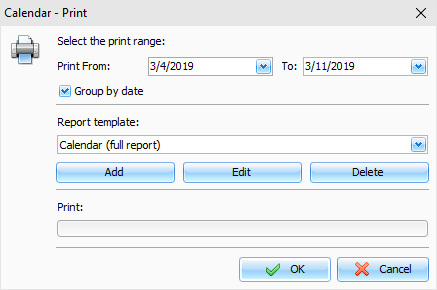
If
you will print your entries in the "List of
entries" style, other window
will appear:
This
function allows you to print a list of entries, using selected
print template. Select the time period you would like to print
appointments at and a print template. If you want to create or edit
a print template, click an appropriate button below the templates
list.
Please, see Creating and editing print templates topic for more
information.
After
setting all desired options, click the "OK button. "Print
Preview" window will be opened.
|