|
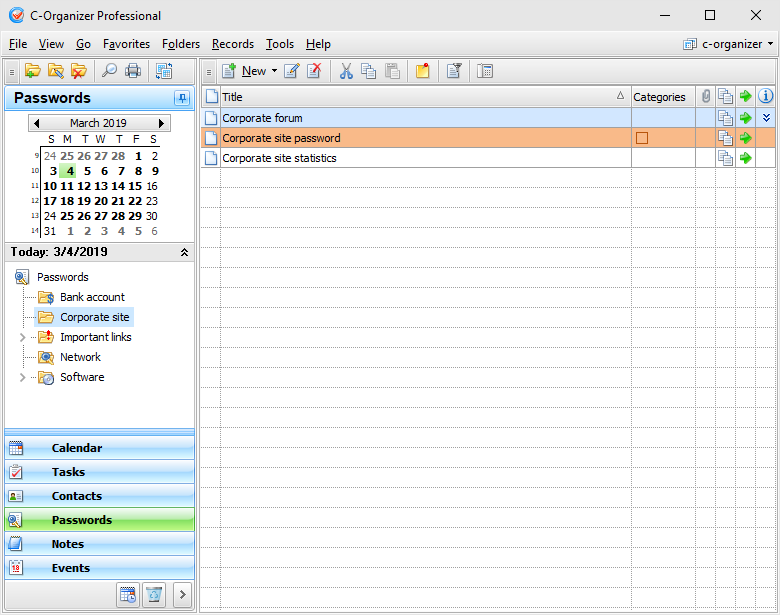
The Passwords mode is intended for storing various passwords,
logins, serial numbers, account numbers and the like. Moreover, you
can use this mode as a bookmark manager
or use it for a quick URL/file
access.
Besides, the Passwords allows systemizing your
information by placing it into the appropriate folders. The data
inside the viewing area has a tree-like structure.
Moreover you can change a folder picture for
better visualization. Just click the "Folders - Change
Icon" main menu item and
choose one of predefined pictures or load own picture from file.
The picture size is 16x16 pixels.
Use
the "New
Folder" button to create a new
folder, "Rename" button to rename folder, and
"Delete
Folder" button to delete
selected folder. Also you can use the Ctrl+Alt+N, Ctrl+Alt+E and Ctrl+Alt+D shortcuts or the context menu commands in the
Documents tree area.
To
simplify the information grouping process we added Drag & Drop
support, so just drag the passwords or the passwords groups to
place them inside folders. Also you can cut or copy any entry
and paste it into other folder using an appropriate buttons or
shortcuts (Ctrl+X, Ctrl+C, Ctrl+V) or using the context menu in the Passwords
area.
Also
you can drag any password to the program calendar to create a new
appointment, linked to this password entry.
You
can filter your entries by category. Just click the
"Filter by
Category" button. In this case
you will see only passwords, which match to the selected
categories.
All
entries in the list can be filled with the first category color, if
this option is on (see the Passwords Preferences).
The
passwords mode integrates automatically with the default Internet
browser installed on your computer. By pressing the
 button, you can open
an URL in the browsers window or launch/open the file according
path entered. button, you can open
an URL in the browsers window or launch/open the file according
path entered.
By
using the  button
the user ID, password or an account number can be copied to the
clipboard with just one mouse click. button
the user ID, password or an account number can be copied to the
clipboard with just one mouse click.
Also
you can preview entry description by pressing the following
button:  . .
Furthermore, a password can be
posted as an electronic sticker on a computers monitor. Just
select a password and click the "Show as
Sticker" button.
See
the How to preview a record and to work with
stickers topic for more details.
Each entry can be edited directly
in the view area.
Also
we've added the Passwords Generator feature ("Tools - Passwords
Generator" main menu item).
Using this function you can easily generate your passwords.
|