|
The
Calendar,
Tasks and
Events
entries have the option to recur. You don't need to create the same
entry every time, just make it recur. You can choose any of the
basic recurring settings: daily, weekly, monthly or annually.
Upon
choosing the main recurrence pattern or clicking the
"Customize" button in the "Add/Edit record" window, the
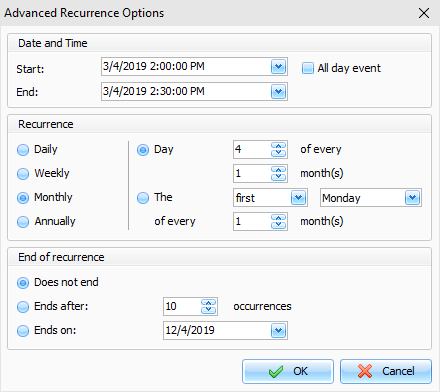
dialog box with advanced recurrence options will open:
The
upper part of the window contains the initial date settings that
you can change. The middle part displays the recurrence details,
and the lower part provides the opportunity to set a recurrence
period: Does not end, Ends after X occurrences or Ends on set
day.
|