Home
C-Organizer Professional Online Help Prev Page Next Page
General information
About C-Organizer Pro
Features overview
Installation and system requirements
How to upgrade C-Organizer v2.x to further versions
Multilanguage interface
Information about updates
Working with C-Organizer Pro
Overview
C-Organizer Pro overview
How to use a calendar
Sharing Data on a Network
How to share Data on a Network
Appointments
Appointments - Overview
Appointments - Adding/Editing appointment
Appointments - deleting appointments
Appointments - Reminder
Appointments - Print
Tasks
Tasks - Overview
Tasks - Adding/Editing task
Tasks - deleting tasks
Tasks - Reminder
Tasks - Print
Address Book
Address Book - Overview
Address Book - Adding/Editing record
Address Book - using templates
Address Book - deleting record
Address Book - Reminder
Address Book - Print
Phone Dialer
Passwords
Passwords - Overview
Passwords - Adding/Editing record
Passwords - deleting record
Passwords - Print
Notes
Notes - Overview
Notes - Adding/Editing note
Notes - deleting note
Notes - Print
Events
Events - Overview
Events - Adding/Editing record
Events - deleting event
Events - Reminder
Events - Print
How to preview a record and to work with stickers
Working with text and descriptions
Creating and editing print templates
Previewing and printing report
Alarm - additional options
Recurrence - advanced options
Program's options
General options
Sound initial options
Additional options
Backup options
Notifications options
Preferences
Appointments
Tasks
Address Book
Events
Reminders
Working with databases
Database manager
Search in database
Import
Export
Backup
Restore
How to protect your information by password
Today window
Today window - Overview
Today window - Print
Copyright and License
Registration
How to order C-Organizer Professional
Limitations of evaluation version
Technical support
Technical support


Tasks - Reminder


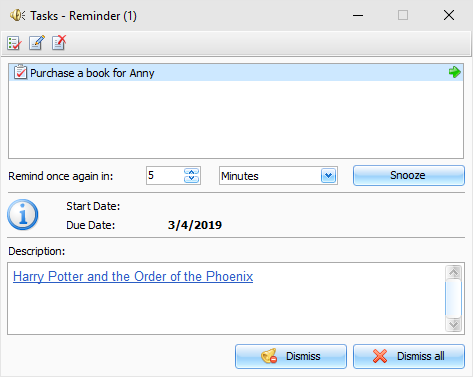
If the Reminder option has been turned on for a task, the program will show a dialog box at the set time with a short task information, and will play a sound file or carry out other actions you scheduled (like opening documents, program startup).


The Reminder dialog box contains the list of tasks, for which the reminders have gone off, tasks begin and end dates, as well as task descriptions.


You can mark a task as completed by pressing the button, open a task for editing (the button) or delete a record (the button) in this dialog box.

Moreover, you can change a reminder time by setting an appropriate time lag and clicking the button.


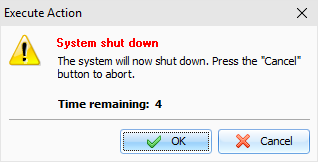
If computer shutdown, reloading or Windows user log off options have been activated in the extended options, when the reminder goes off, a dialog window will appear. You can use this dialog window to cancel previously scheduled commands (shutdown, reloading, logging off).


Copyright © CSoftLab™ 2000-2007 All Rights Reserved.

Browser Based Help. Published by chm2web software.