|
We've
added a phone dialer to dial the phone numbers stored in the
Contacts records. You can dial number using Skype or by phone. To
make call by phone, you need to have a modem installed on your
computer.
To
open the Phone Dialer, click the  button near the contact title or use the
"Tools -
Phone Dialer" program's main
menu item. button near the contact title or use the
"Tools -
Phone Dialer" program's main
menu item.
The
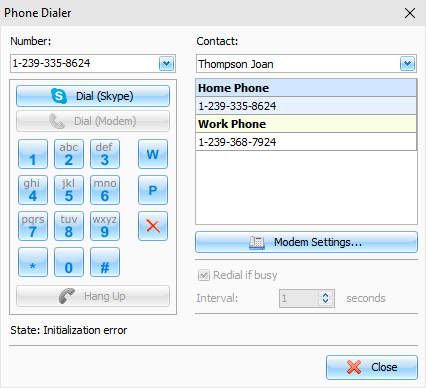
"Phone Dialer" window will appear:
In
this window you can enter a phone number manually or select it from
the available phone numbers of selected contact.
Then
click the "Dial" button to start dialing.
To
cancel dialing, click the "Hang Up" button (not supported for Skype).
To
start talking over the phone, pick up the phone and then click the
"Hang
Up" button.
If
the "Redial
if busy" option is turned on,
the phone number will be redialed automatically if the line is busy
(not supported for Skype).
To
customize the modem settings, please click the "Modem
Settings" button.
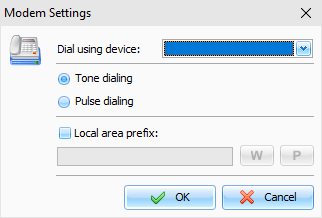
The
dialog box will appear:
Using
this window you can select device to dial the phone numbers,
dialing options (pulse or tone dialing), and local area call prefix
if necessary (this prefix will be dialed before the phone
number).
|