|
To
work with the audio and video diaries, open the Multimedia Diary
tab:
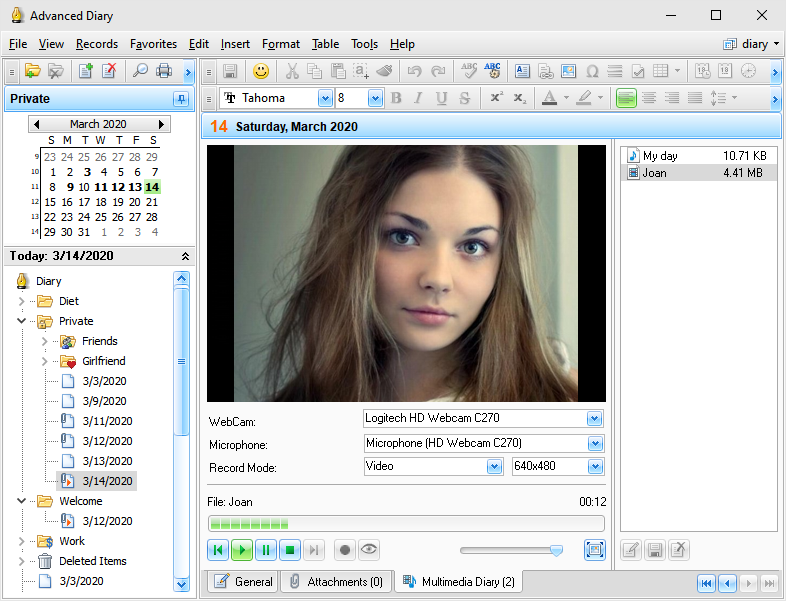
In this window you can record and
play your multimedia diaries.
Options:
WebCam
- if more than one webcam attached to
your computer, you can select which webcam will be used to record
video.
Microphone - if more than one microphone attached to your
computer, you can select which microphone will be used to record
voice (In Video record mode only. If you select Audio mode,
Advanced Diary will use default microphone).
Record
Mode - here you can select
what to record (Video or Audio diary).
Resolution
- here you can change a resolution
for video recording.
Use the Play, Pause, Stop, Next, Previous and Record buttons to start and stop recording, and to play
existing multimedia diaries.
Note:
Advanced Diary keep all recorded
audio and video diaries directly in the database.
Preview - use this button to get video from your webcam.
This can be convenient, when you recording video diary. If your
computer does not have any webcams attached, this button is
disabled.
Volume - use it to change the sound volume when playing
your audio or video diaries.
Full Screen
- opens built-in multimedia player in
the full screen mode.
To
rename existing voice diary click the Rename button.
To
save any audio or diary into a file, click the Save As button.
To
delete selected multimedia diary click the Delete button.
When
you play audio or video diary, you can scroll it using the progress
bar above. Just click desired
position and your file will be played from this
position.
You
can find all your attachments including audio and video diaries in
the Attachments
manager window.
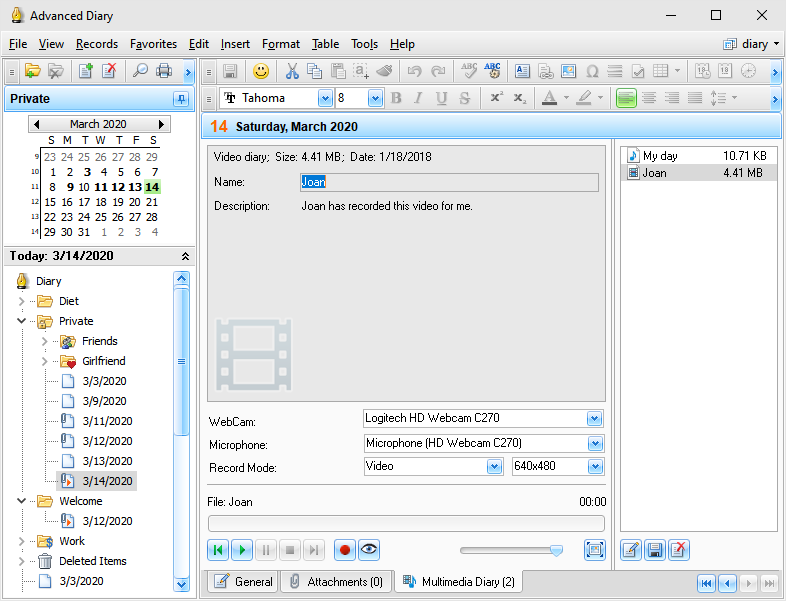
As
well as for attached files, you can not only rename your multimedia diary, but also add
description, if necessary:
Important:
When
you recording video, Advanced Diary uses XviD MPEG-4 Video Codec to
compress video file. This codec is necessary for the program. If it
is not installed on your computer, Advanced Diary will show an
appropriate message. You can download XviD MPEG-4 Codec
here:
http://www.xvid.org/
This
codec is absolutely free. You don't need to pay for it.
Please restart Advanced Diary after you download
and install XviD MPEG-4 Codec.
|