|
Advanced Diary is capable of working with
multiple databases. You can create new databases on your
own and swap between them while you are working.
The
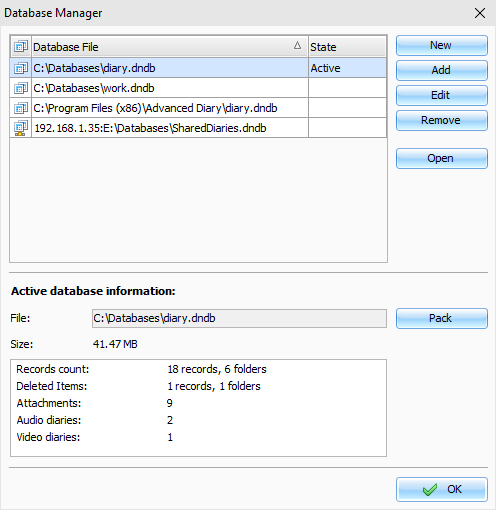
Database manager window looks as following:
In
the Database manager dialog box you can see your databases list.
You can create new databases, add or edit connections or remove
database from list by pressing an appropriate buttons
(New, Add, Edit and Remove).
To
open any of listed databases, please select this database and click
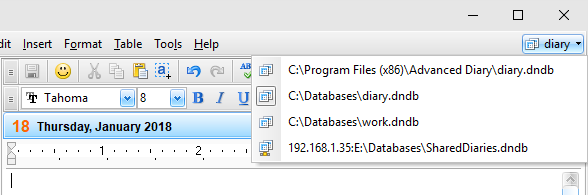
the "Open"button. Also you can switch between databases
and in the main window by clicking a button with active database
name. You will see a list of available databases:
At
the bottom of Database manager
window you can see the
Active database
information: file path,
database size, information about records and attachments count
etc.
Here you can pack active database
file by pressing "Pack" button. This will optimize the database size.
We recommend pack database from time to time if you've deleted a
large amount of data.
Note:
when you connected to a server, Pack
function is available for database administrator only.
When
you create new database as well as add or edit existing connection,
the "Database
Connection" window will be
opened:
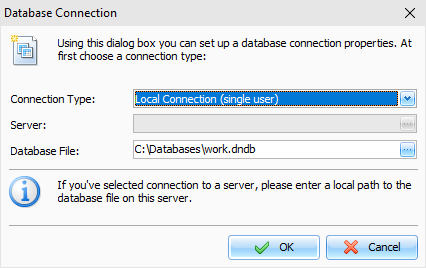
If
you are working with local connection (single user), please select
an appropriate connection type and enter a full local path to the
database file (as you see it from your computer). After this click
the "OK" button.
Advanced Diary will create database file (if you
choose new database) and add connection to the databases
list.
If you would like to share data in a
network and connect to a server, please see this help topic for
more details:
Connection to a server
|