|
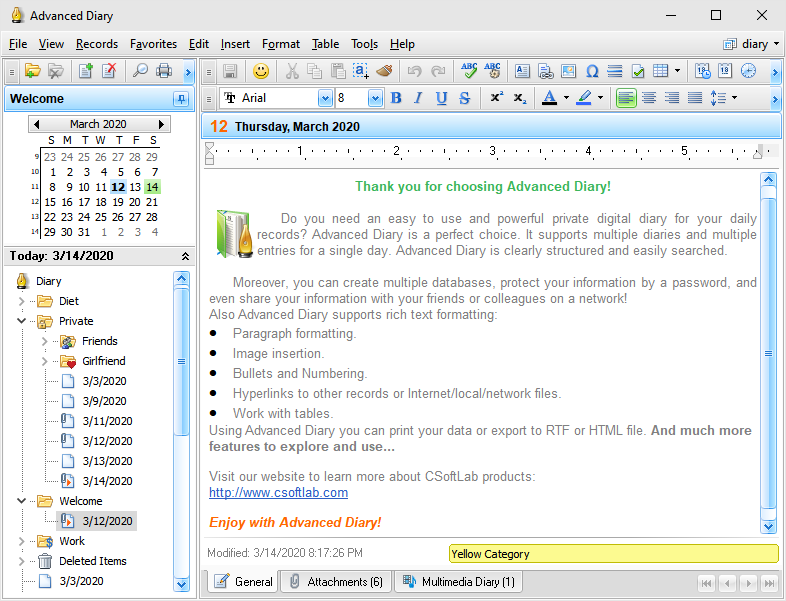
Advanced Diary supports two navigation types:
Calendar (show by date) and Document Tree (show by file).
You
can access diary entries by simply jumping to a certain date or by
clicking the diary entries in the Document Tree.
To
make editing and viewing entries easier, the dates on the program
calendar that have entries, are marked in a bold font. To switch quickly to a current date, just
right-click the calendar with the mouse button and choose
Go to
today.
The
entries in the Documents Tree displays a so-called "file tree" so
you can can open a desired file immediately. To change the
documents sort order just click the "Records - Sort
By" main menu item.
Since both navigation types are
useful in their own unique ways, you can use any of them, depending
on the situation.
The
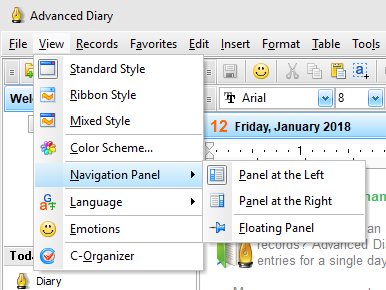
Calendar and Documents tree are placed on the navigation panel in
the left part of the program's main window. You can show, hide left
panel, or change its position using "View - Navigation
Panel" main menu item:
The
right part of the program's main window is intended for showing
your diary entry. Here you can view, edit or write the new entries.
Advanced Diary can be minimized to system tray
(near the system clock) if an appropriate option is selected in the
program General
Options.

You
can open the main program's window by clicking the icon in system
tray with the left mouse button, or if you click the right mouse
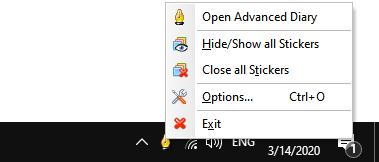
button, you will see a popup menu with the most frequently used
functions of the program:
·Advanced
Diary - opens the main window
of the application, just as the left mouse button click
does.
·Hide/Show
all Stickers - opens or
minimizes all opened sticker windows.
·Close all
Stickers - closes all opened
sticker
windows.
·Options - the program settings.
·Exit - exit from the program (is similar to the
command "File - Exit" of the main menu).
|