Home
Advanced Diary Online Help Prev Page Next Page
General Information
About Advanced Diary
Features Overview
Installation and system requirements
How to upgrade Advanced Diary v1.x - 2.x to further versions
Interface types and colors
Multilanguage interface
Information about updates
Working with Advanced Diary
Overview
Portable mode
How to share Data on a Network
Working with folders
Working with records
Favorites
Voice Diary
Attached Files
Working with Categories
Working with text
Working with diary templates
How to send an entry by email
How to work with stickers
Advanced Diary - Print
Creating and editing print templates
Previewing and printing report
Program's options
General options
Additional options
Backup options
Text Editor options
Fonts options
Working with databases
Database manager
Search in database
Import
Export
Backup
Restore
How to protect your information by password
Copyright and License
Registration
How to order Advanced Diary
Limitations of evaluation version
Technical Support
Technical Support


Additional options


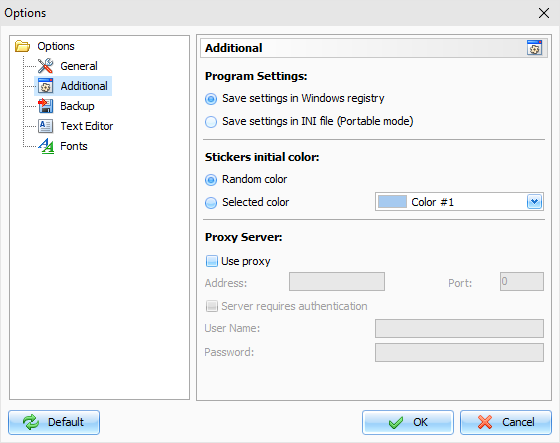
The Additional options window looks as following:


The additional options mode allows to set up where Advanced Diary will keep the program settings.

You can choose one of these options:

Save settings in Windows registry - all program settings will be stored in Windows registry.

Save settings in INI file - when this options is on, Advanced Diary works in portable mode. You can copy or install it on any removable storage device and then use on any computer.


Also in this window you can change the Stickers initial color. There are two options available: you can select Random color - in this case C-Organizer will use one of 15 predefined colors, or you can select one static color.


Advanced Diary can load templates for each new entry automatically. Just turn on this option and select a template, which you want to load.


Copyright CSoftLab 2000-2012 All Rights Reserved.

Converted from CHM to HTML with chm2web Standard 2.85 (unicode)