|
You
can send any entry by email. Just select an entry, which you want
to send and click the "Records - Send by
Email" program main menu item.
A dialog box will be opened:
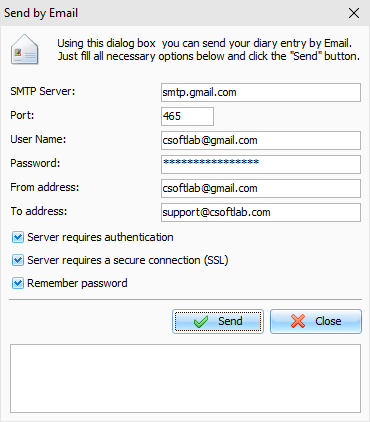
Here
you should fill all necessary options:
SMTP Server
- SMTP server, which sends out Email
messages.
Port - default port for outgoing mail.
User ID - User name (to authorize access).
User password
- password (to authorize
access).
From address
- the Email sender's
address.
To address - Email recipients address. Advanced Diary
supports multiple (comma separated) Email addresses.
Server requires
authentication - mark this
option, if authentication is required.
Server requires authentication
- turn on this option, if
secure connection is required.
Remember password
- mark this option if you don't want
to enter password next time, when you will send a message. Advanced
Diary will remember it with another email options.
Then
click the Send button and your diary entry will be sent as an
attached to email message RTF document.
Note: to send the email messages, you need to have
active Internet connection.
|