Home
Advanced Diary Online Help Prev Page Next Page
General Information
About Advanced Diary
Features Overview
Installation and system requirements
How to upgrade Advanced Diary v1.x - 2.x to further versions
Interface types and colors
Multilanguage interface
Information about updates
Working with Advanced Diary
Overview
Portable mode
How to share Data on a Network
Working with folders
Working with records
Favorites
Voice Diary
Attached Files
Working with Categories
Working with text
Working with diary templates
How to send an entry by email
How to work with stickers
Advanced Diary - Print
Creating and editing print templates
Previewing and printing report
Program's options
General options
Additional options
Backup options
Text Editor options
Fonts options
Working with databases
Database manager
Search in database
Import
Export
Backup
Restore
How to protect your information by password
Copyright and License
Registration
How to order Advanced Diary
Limitations of evaluation version
Technical Support
Technical Support


Export


The Export function allows you to convert Advanced Diary database information into other formats and to share this information with other programs.

To use this function, choose File Export in the main program's menu.


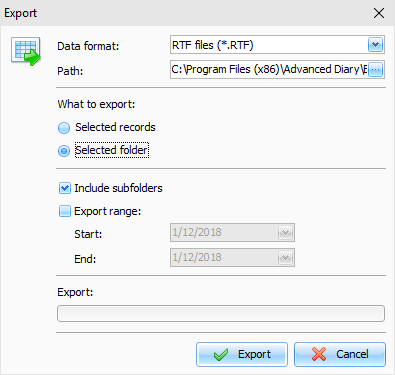
The export dialog box will appear:


Set the format to which you would like to convert the information.

The following formats are supported:

Rich text files (*.RTF)

HTML files (*.HTM)

Text files (*.TXT)

Advanced Diary databases (*.DDB)


Specify the destination folder (or a destination file if you export into the database) to which you want to export the information.

Choose the information you would like to export, using What to export options.

Then click the Export button.


You will see the Export process indicator in the lower part of the dialog box. The notification message will appear when the export process is complete.


Copyright CSoftLab 2000-2012 All Rights Reserved.

Converted from CHM to HTML with chm2web Standard 2.85 (unicode)