Home
Advanced Diary Online Help Prev Page Next Page
General Information
About Advanced Diary
Features Overview
Installation and system requirements
Multilanguage interface
Information about updates
Working with Advanced Diary
General
Overview
Working with diaries (folders)
Working with records
Voice Diary
Attached Files
Working with text
Advanced Diary - Print
Previewing and printing report
Program's options
General options
Backup options
Fonts options
Background options
Working with databases
Database manager
Search in database
Import
Export
Backup
Restore
How to protect your information with a password
Copyright and License
Registration
How to order Advanced Diary
Limitations of evaluation version
Technical Support
Technical Support


Restore


Use the Restore function to restore of the Advanced Diary database from the previously created backup copy.

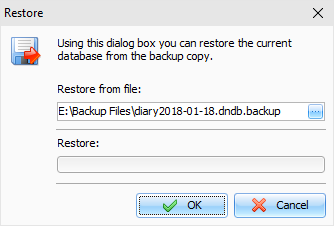
To the restore Advanced Diary database, select the File – Restore… menu item of the Advanced Diary main window. After that you will see the "Restore" dialog box.


Specify the file name and location from which you want to restore the information (by pressing the button).

After that, press the "OK" button.

You will see a progress indicator of the restore at the bottom of the window.


After the process is completed, you will see the appropriate message.


Copyright © CSoftLab™ 2000-2007 All Rights Reserved.

Browser Based Help. Published by chm2web software.